Google Forms App for iPhone: Safari or a Companion App?
You can use Google Forms on an iPhone or iPad in Safari without installing a companion app. Open forms.google.com, sign in to create or manage a form, and use the browser editor. If someone sent you a form to fill out, open their responder link instead.
How to open Google Forms on iPhone
- Open Safari and visit forms.google.com.
- Sign in with the account that owns the form or has editing access.
- Open an existing form, or choose Blank form to create one.
- To fill out someone else’s form, use the link they shared and follow that form’s access requirements.
Google’s iPhone and iPad instructions describe this browser workflow. For screenshots and a worked example, see how to create a Google Form on iPhone.
Is an App Store listing an official Google Forms app?
Check the seller rather than relying on the app’s name. pipiform’s Forms for Google Drive is an independent app from BurningFlower INC, not an official Google app. Its subscription and features are separate from Google Forms in your browser. The dated App Store sample below is not a live inventory of all available apps.
Three things that are easy to confuse
| Option | What to evaluate |
|---|---|
| Google Forms in a mobile browser | Whether the browser workflow covers your editing and response tasks |
| Google Drive app | How you find the form file and what happens when you open it |
| An independent Forms companion app | Its publisher, supported tasks, requested access, and subscription |
Google’s iPhone and iPad guide directs users to a browser to create a form and points to Drive for finding existing forms. Those are different jobs. Seeing a form in Drive does not mean you are using a dedicated Forms editor inside the Drive app.
What our App Store sample can tell you
pipiform’s archived August 20, 2026 search sample contains US, UK, and Japan storefront results for “google forms.” No result identified as Google LLC’s own Forms app appears in that sample. This is a dated observation, not proof about every country or future availability.
The sample also shows why titles are an unreliable way to compare apps. Our own app has the same app ID across three storefronts, but different displayed names. Use the seller and app ID when matching listings. Read the sample analysis and download the data.
Choose using a real task
Before comparing feature lists, write down one job you actually need to complete. For example: “Change tomorrow’s registration choices, check the latest responses, and share the form from my phone.” Then try that same job in each workflow.
Record where you get stuck. Is the problem finding the file, editing a particular question, controlling who can respond, or making a report? Buying an app will not automatically solve a form owner’s access restriction. A shorter, clearer form may also help more than changing the tool used to create it.
Use a test form for this comparison. A convenient interface is valuable, but you should also be comfortable with the account access requested and understand how to cancel an optional subscription.
Where pipiform fits
Forms for Google Drive is our independent iOS product, provided by BurningFlower INC. It is not an official Google app. Its subscription is $59.99/year with a three-day trial under the published plan.
Form Timer for Google Forms is a separate Workspace add-on. Its Pro plan is $80/year or $10/month. A shared pipiform brand does not make the two subscriptions interchangeable. See the product-specific pricing.
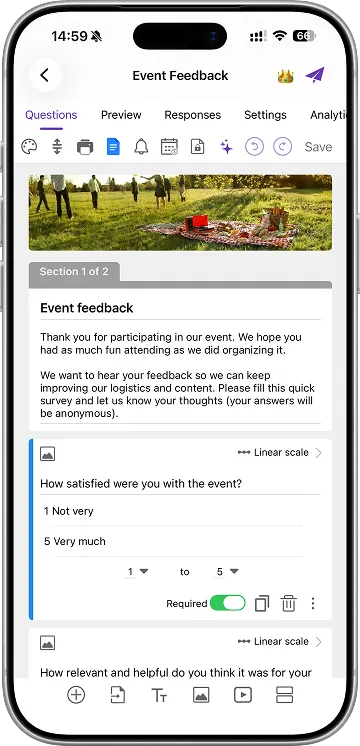 Reused original pipiform app screenshot. It illustrates the independent app interface; it is not an App Store search result or evidence of current app availability.
Questions to answer before installing
- Does the listing identify the publisher you intended to choose?
- Can you complete your important task during the available trial or free allowance?
- Is the price a download charge, subscription, or one-time purchase?
- Does the app describe the platform and limitations you care about?
- Can you find support and understand the requested account access?
Is “free to download” enough to compare cost? No. It describes the download price, not every feature or subscription.
Which option should a new user try first? For a basic form, start with the browser registration example. You will have a clearer basis for evaluating optional tools once you know which part of the workflow needs improvement.
Choose between our iOS app and Workspace add-on
On iPhone and iPad. Forms for Google Drive is pipiform’s independent iPhone/iPad app, not an official Google Forms app. Use it when native mobile form editing and response review are the tasks you want to improve.
With the Workspace add-on. GPT for Google Forms is our separate Workspace add-on for AI-assisted form drafting on a computer. Install it from Marketplace for that desktop workflow. An App Store download and a Workspace installation are different products with different plans. See GPT for Google Forms by pipiform for the product workflow.
View GPT for Google Forms and its features · Install the add-on · Get Forms for Google Drive on the App Store
The app and Workspace add-ons are separate pipiform products. Forms for Google Drive is US$59.99/year with a 3-day trial; check the App Store offer for your region. Check the current add-on allowance and plan before generating a larger set of forms. See current product pricing before subscribing.